Firacard is the new kid on the block when it comes to group greeting cards, but I am so glad they are here!
Great easy to use product, affordable and so worth it. Enii My girlfriend sent me a Firacard during my last birthday. I was astonished to see all the wishes and pictures from family and friends back home.
Thanks for the huge surprise. I absolutely loved it. Amit Great service! I found it easy to set up a card for my friend and invite others to sign her car. She really loved it.
Well done Firacard team. Grace Firacard exceeded my imaginations, the delivery of my birthday board was very prompt and the fact that I can password protect my board preventing unauthorized contributions makes it top notch for me. ID
The Power of Collaboration: Farewell ecard for office team
Experience Effortless, Eco-Friendly Group Greeting Cards with Firacard’s Customizable Features
Get the best Group Greeting Cards for free with Free Board plan. Create and send a group card today. Zero Cost Required.
Free Group Cards
We want you to treasure every moment, so we made sure you can download each Firacard you receive! – its both a card and a keepsake! Forever!
Unlimited Contributors
With Firacard, creating a group greeting card takes just a few minutes. You’ll be done before you know it!
Save Time
We want you to trasure every moment! Download and preserve any Firacard you Receive – It’s both a card and a keepsake, Forever!
Downloadable Keepsakes
Firacard is super easy to use, and our step-by-step guide guarantees everyone can create their first card or contribute to an existing one.
Convenient & Easy to Use
Firacard is super easy to use, and our step-by-step guide guarantees everyone can create their first card or contribute to an existing one.
Customisable & Uniquely Yours
Sending group greeting cards for various occasions is now effortless with automated scheduling.
Automatic Scheduling
Embrace the Green Revolution and go paperless. Make a positive impact on the environment by creating and sending Firacard virtual group greeting cards.
Eco-Friendly
A portion of every purchased group greeting cards help plant a tree through our partnership with the non-profit
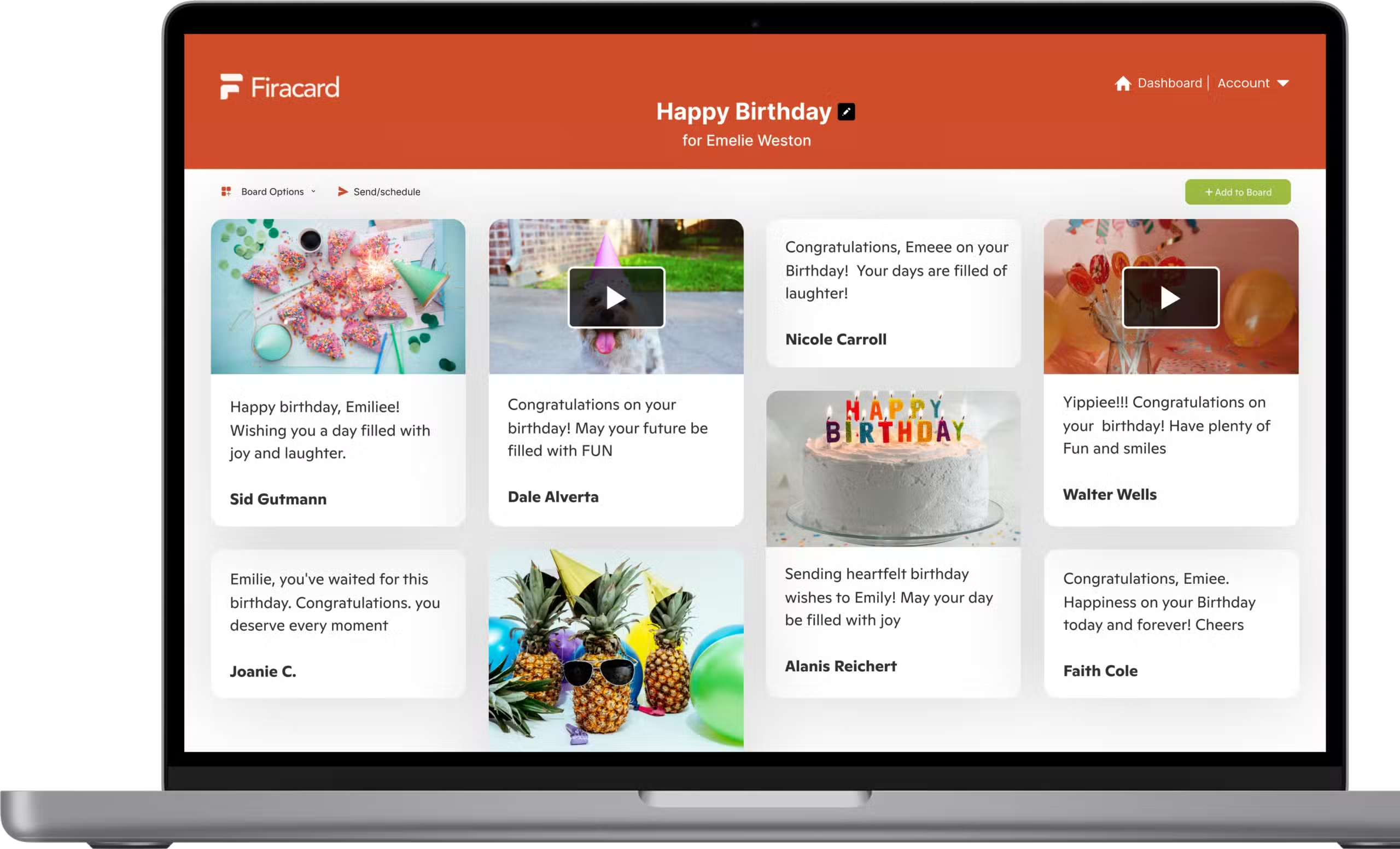
What is a Firacard? A Firacard is a digital greeting card that can be signed alone or by multiple people and sent to someone special. You can customise your Firacard by changing the background and fill your Firacard with messages, pictures, GIFs, and videos It’s like passing a big card around the office but easier, quicker and so much more convenient. Is Firacard available for different occasions? Absolutely! Firacard can be used for various occasions like birthdays, holidays, anniversaries, or just to brighten someone’s day. Is there a limit to the number of Firacards I can send? No, there’s no limit! You can send as many Firacards as you like and spread joy to all your loved ones. How is Firacard different from traditional greeting cards? Firacard offers the convenience of digital cards while still allowing for personalization and creativity. It’s like passing a big card around the office, but way easier and quicker! How can I get in touch with Firacard support? If you need any assistance or have any questions, feel free to reach out to us at support@firacard.com. We’re here to hel Is my Firacard private? Yes! Your Firacard can only be accessed by you and the users you’ve invited to contribute to it. After the Firacard is sent, the recipient can decide to share a public link to it.What is a Firacard? A Firacard is a digital greeting card that can be signed alone or by multiple people and sent to someone special. You can customise your Firacard by changing the background and fill your Firacard with messages, pictures, GIFs, and videos It’s like passing a big card around the office but easier, quicker and so much more convenient. Is Firacard available for different occasions? Absolutely! Firacard can be used for various occasions like birthdays, holidays, anniversaries, or just to brighten someone’s day. Is there a limit to the number of Firacards I can send? No, there’s no limit! You can send as many Firacards as you like and spread joy to all your loved ones. How is Firacard different from traditional greeting cards? Firacard offers the convenience of digital cards while still allowing for personalization and creativity. It’s like passing a big card around the office, but way easier and quicker! How can I get in touch with Firacard support? If you need any assistance or have any questions, feel free to reach out to us at support@firacard.com. We’re here to hel Is my Firacard private? Yes! Your Firacard can only be accessed by you and the users you’ve invited to contribute to it. After the Firacard is sent, the recipient can decide to share a public link to it.What is a Firacard? A Firacard is a digital greeting card that can be signed alone or by multiple people and sent to someone special. You can customise your Firacard by changing the background and fill your Firacard with messages, pictures, GIFs, and videos It’s like passing a big card around the office but easier, quicker and so much more convenient. Is Firacard available for different occasions? Absolutely! Firacard can be used for various occasions like birthdays, holidays, anniversaries, or just to brighten someone’s day. Is there a limit to the number of Firacards I can send? No, there’s no limit! You can send as many Firacards as you like and spread joy to all your loved ones. How is Firacard different from traditional greeting cards? Firacard offers the convenience of digital cards while still allowing for personalization and creativity. It’s like passing a big card around the office, but way easier and quicker! How can I get in touch with Firacard support? If you need any assistance or have any questions, feel free to reach out to us at support@firacard.com. We’re here to hel Is my Firacard private? Yes! Your Firacard can only be accessed by you and the users you’ve invited to contribute to it. After the Firacard is sent, the recipient can decide to share a public link to it.How do I create a Firacard?
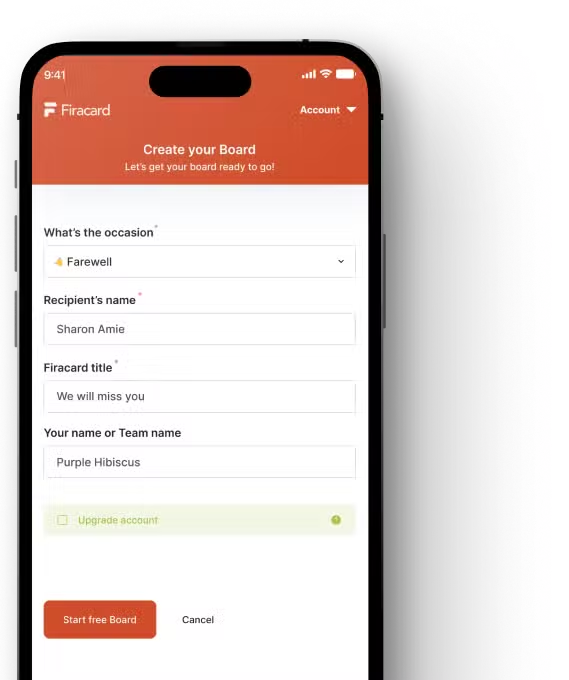
Creating a Firacard is easy! Follow these steps to create your firacard:
Enter the recipient’s name, board title for example, “Happy Birthday, Jane!”, then click start your free board.
You can now write your first message, change the Firacard background to personalise it and then click invite others to contribute.
If you want to upgrade your Firacard, simply tick the upgrade box. You will see the infinity firacard and premium firacard option. Click on your preferred option to upgrade.
Do I need to register before creating a Firacard? Yes, registration is required to create a Firacard. When you register, you become the owner of the Firacard until it is sent to the recipient. Registering comes with some awesome perks! Once you’re registered, you become the proud owner of your Firacard until it’s sent to the lucky recipient. 🎉 Plus, you can return to your Firacard anytime to make it even more special. You can edit, invite contributions from others, and when it’s ready to shine, send it to the recipient! Can I change the design of my Firacard? Yes, you can fully customize your Firacard by changing the background and adding various media elements to make it uniquely yours How is Firacard different from traditional greeting cards? Firacard offers the convenience of digital cards while still allowing for personalization and creativity. It’s like passing a big card around the office, but way easier and quicker! Can I invite others to contribute to the Firacard I created? Absolutely! As the registered owner, you can invite others to contribute to the Firacard and make it a joint masterpiece! Teamwork makes the dream work, after all! Can I delete a Firacard? You can delete a Firacard you have created only before it is sent to the person you created it for. Once the Firacard is sent, only the recipient can delete it. Can I download a Firacard I created? No, You cannot download a firacard you created. Only the recipient of a Firacard can download it. Of course after downloading they can choose to send you a copy of their downloaded Firacard.
How do I invite others to contribute to the Firacard I’ve created? After creating your Firacard, you will see the “invite contributors (or not)” icon at the top of your screen. When you click on this, you will be able to copy the link using the copy link button and share on any social media channel. You can also share the link directly through the social media icons provided. Can multiple people sign a Firacard? Absolutely! You can have a group effort and get multiple people to sign a Firacard, making it a collaborative and memorable experience. Can I edit contributors from others? To maintain the integrity of the Firacard and preserve the contributions of others, editing entries is not allowed. However, you can freely delete any messages that don’t quite fit the vibe you’re going for. Can I delete messages from a Firacard? Yes, as the creator of the Firacard, you have the authority to delete any entries you consider inappropriate or not up to the mark. We want your Firacard to be just perfect! Note: Only the creator of the Firacard is allowed to delete entries. How can I delete an entry from my Firacard? It’s super easy! To delete an entry, click on the options menu located in the top right corner of the message you wish to remove. Then, simply select “Delete,” Do I need to register to sign a Firacard? No, registration is not required to sign a Firacard. You can fill out a Firacard without the need for an account. What are the benefits of registering before filling a Firacard? While it’s not mandatory, registering for an account comes with some additional perks. If you choose to register, you’ll be able to edit your contribution to the Firacard even after signing it. Additionally, registering enables you to receive a response from the recipient, making it more interactive and engaging. Can I register after I’ve already filled a Firacard? Yes, absolutely! If you’ve filled a Firacard without registering, you can still create an account later on. Just head over to the registration page and follow the simple steps to set up your account. Is there a maximum number of people who can contribute to a Firacard?
There are different options for the number of contributors based on your chosen plan:
Free Firacard: You can have up to 10 contributors for free. Gather your closest friends and family to create a heartwarming card together!
Premium Plan: Upgrade to our premium plan, and you’ll have the ability to include up to 100 contributors! Spread the joy even further with a larger group of loved ones.
Infinity Plan: With our Infinity plan, the possibilities are endless! There is no limit to the number of contributors who can join in the fun and make your Firacard truly unforgettable.
So, whether you want an intimate gathering or a grand celebration, we have the perfect plan for your Firacard experience! 🌈✨
No, you are not able to resend your firacard after it has been sent to a recipient. If you have made a mistake while sending your Firacard, please contact our support team. support@firacard.com
Does a Firacard expire? The Firacard that you have received remains accessible to you indefinitely; as we like to say, it is yours forever How can I express my gratitude to everyone who contributed to my Firacard? You can easily send a general thank you message to all the contributors from within the Firacard you received. We’ve designed it this way to make it stress-free for you, so you don’t have to worry about sending individual thank you messages. Show your appreciation to everyone with just one heartfelt thank you! 💌😊 Can I download a Firacard I received? Yes! You can download the firacard you have received and it’s yours forever. All you need to do is open your Firacard from the link you received in your email. Click Download and you’ll get a high-resolution image of your Firacard. If you added video messages, they will be included as well. You cannot download a Firacard that you created or contributed toHow much does a Firacard cost? Firacard is absolutely free to use for you and up to 10 contributors. Spread the joy together with your nearest and dearest without any cost! Are there any premium features available for Firacard? Yes! We’ve got some incredible premium features that take your Firacard experience to the next level. For a small fee, you can have more contributors (up to 100), the ability to upload GIFs and videos, enjoy an ad-free board and so much more! What’s the difference between a premium Firacard and an Infinity Firacard? A premium Firacard grants you access to the amazing premium features we mentioned earlier. But if you want to go all out, the Infinity Firacard has it all – unlimited contributors, GIF & video uploads, and ad-free boards, all rolled into one! 🚀 How can I purchase a premium Firacard or Infinity Firacard? It’s a breeze! Just head over to the pricing page on our website, and you’ll find all the details to upgrade to your desired plan. With the premium features, your Firacard experience will be nothing short of extraordinary! What if I have more questions about the premium features or pricing? No worries at all! If you have any other questions or need more info, our friendly support team is just an email away. Reach out to us at support@firacard.com, and we’ll be thrilled to assist you! Let’s make your Firacard journey unforgettable with the perfect plan for you! ✨ Can I print the Firacard I received? A PDF version of the Firacard will be available to download and print after the Firacard has been delivered. This feature is available for all Firacards! Can I send cash to the recipient in the form of a Gift card? No. You can only send messages, pictures, GIFs, and videos. Can I send a Firacard to multiple recipients? Yes, with the Premium and Infinity plans, you can send a Firacard to multiple recipients. You can do this either by typing their emails into the recipient box or my uploading an excel sheet with the names and email addresses of the recipients.How do I upgrade my firacard? At the bottom of your dashboard, click the Upgrade Board button. You will be directed to a new page where you can select your desired upgrade option and pay. You can either upgrade to a premium firacard or an infinity firacard. Once you put in your card details, click the Upgrade Board button, and make your purchase. After which, you will have immediate access to the upgraded board features. Any changes made to the firacard previously will be saved. Which Firacard option should I choose, and how much does it cost? A Premium Firacard allows 100 contributions on a single firacard for a one-time charge of $5.99. You and your contributors are able to add photos, GIFs and videos to your messages and download your firacard as a slideshow.
An Infinity Firacard allows you an unlimited number of contributors for a one-time charge of $19.99. You and your contributors are able to add photos, GIFs and videos to your messages and download your firacard as a slideshow. Can I upgrade or downgrade my Firacard? You can upgrade you Firacard from a free plan to either a Premium or Infinity plan. You can also upgrade your Firacard from a Premium plan to an Infinity plan.
Unfortunately, you cannot downgrade your Firacard. But our Premium and Infinity plans have so much to offer, you’ll surely find the perfect fit for your needs! 🌟 Do I need to pay each time I create a Firacard? No, you do not need to pay each time you create a Firacard. You only need to pay if you create a Premium firacard or an infinity firacard. What kind of payments do you accept? Our online payments are processed through Stripe, which accepts all major debit/credit cards. You will receive an emailed receipt immediately after the purchase. How do I request a refund? If you need to request a refund, please contact us at help@firacard.com with a summary of the request and we will assist you with it. Can I cancel my Firacard plan at any time to avoid future billing? If you have purchased a Premium or Infinity firacard, it is a one-time purchase and not a subscription. There is no need to cancel it because you will not be charged in future for the purchase. Where can I find my Firacard receipt? Once you make a purchase, you will receive an email immediately to the email address associated with your account.
I can not sign the Firacard. What should I do? First, check if the card is already delivered. The card can not be signed after delivery. In this case, contact the card creator. What browsers do you support? The browsers we mainly support are edge, firefox, safari, and chrome. We do not support IE older versions. My Firacard has not been received. What can I do? Sometimes the email goes to the promotion tab or spam tab. Please check other tabs in case you haven’t received the email. Sometimes companies have a firewall that blocks email. In this case, you can manually share the card URL directly. My recipient did not receive an email notification of their Firacard. What should I do? The good news is that your recipient can go ahead and login to firacard and they will see their Firacard on the Received board tab. As regards notification, In some cases we have seen this happen because of the recipient’s email servers. Our system will continue retrying to send this message for 48 hours until it has been sent, or until recipient email servers hard bounce it after 48 hours of our system trying to send it Why might the email notification not have been received? In some cases, email delivery can be affected by the recipient’s email servers. Don’t worry; our system will keep trying to send the notification for 48 hours. If the email is not delivered during that time, it might be due to the recipient’s email servers hard bouncing it. Rest assured, we’ll do our best to ensure your recipient receives their Firacard How do I request a refund? If you need to request a refund, please contact us at help@firacard.com with a summary of the request and we will assist you with it. Can I cancel my Firacard plan at any time to avoid future billing? If you have purchased a Premium or Infinity firacard, it is a one-time purchase and not a subscription. There is no need to cancel it because you will not be charged in future for the purchase. Where can I find my Firacard receipt? Once you make a purchase, you will receive an email immediately to the email address associated with your account.Can I delete my account? Even though we are sad to see you go, Yes, you can delete your account. How do I change my password? Go to your account-> profile-> account security My Password reset email has not arrived It is likely that the email has been blocked due to a firewall or has gone into your spam or promotion folder.
Pricing
Cost-effective Group Greeting Cards: Share Celebrations Virtually & Create Lasting Keepsakes (Save Time, Treasure Memories!)
Free Board
For Individuals, small Businesses and Organizations
Saying goodbye to a colleague is never easy, but a digital leaving card can make the moment feel more personal and bring everyone together. Using a Read more
An online leaving card is the modern answer to organising a group farewell in the UK, especially when your team is spread out. Think of it as the d Read more