50th Birthday Wishes: 8 Meaningful Templates
Finding the right words for a 50th birthday can feel oddly difficult. You want to honour a major milestone without making the message sound like a


Sep 16, 2026 | 12 Min Read

The anniversary is tomorrow, and the card still has to pass through six inboxes, two time zones and one colleague who's on annual leave. Someone has a paper card in a desk drawer, someone else has the wrong address, and the person organising it is rewriting the same reminder for the third time. A free anniversary card maker changes the task from moving paper between people to coordinating one shared contribution space.
That distinction matters for partners, families, remote colleagues and hybrid teams. The UK greetings-card market remains large and mature, with the physical market valued at £1.42 billion in 2023, while online card sales were estimated at £212 million that year, according to Moonpig Group's market overview and its 2024 market report. A digital workflow isn't a novelty. It's a practical response to how people now organise celebrations.
A paper card works beautifully when everyone is in the same room. It becomes awkward when a partner is travelling, a family is spread across countries, or a people team needs contributions from remote staff before a work anniversary. The organiser has to find the card, explain where it is, remember who has signed it and protect the surprise. Every handoff introduces another chance for delay or damage.
A group online card removes those handoffs. One organiser creates the board, contributors receive a link, and each person adds a message, image or short video from their own phone or laptop. That makes an online leaving card, a work anniversary card or a family group greeting card easier to coordinate without asking one person to become the project manager of a piece of stationery.
Practical rule: Optimise for the contributor who has thirty seconds, not the organiser who has already invested half an hour.
The choice between digital and paper also depends on the occasion. A physical card may suit a carefully chosen keepsake, while a digital board suits many voices, distributed teams and scheduled delivery. For a wider comparison of the practical trade-offs, see this guide to digital greeting cards versus paper cards. If you're creating physical items for a customer or campaign rather than a personal celebration, greeting cards for brand merch is a useful resource for exploring custom printed options.
The UK online greetings-card retail sector was estimated at £338.7 million in 2026, with 446 businesses operating in the category, according to IBISWorld's UK industry data. That mature environment makes usability more important than broad claims about ecards. The right outcome is simple: contributors can sign quickly, the organiser can check the board, and the recipient receives something that feels collective rather than automated.
Start with the occasion, not the decoration. Decide whether the card is for a couple, a partner, a wedding anniversary or a colleague marking a work anniversary. The relationship determines the tone, the contributor list and the kind of media that belongs on the board.
A strong anniversary template creates a clear opening message without taking over the card. Look for a design with enough space for several contributions and a visual style that matches the recipient. A playful layout can suit close friends, while a restrained colour palette usually works better for workplace recognition.
You can use an anniversary card template guide to think through the design before inviting anyone. The most important choice is whether the template supports the story you want contributors to tell. A photograph from a shared trip, a GIF linked to an inside joke or a short video from a remote colleague can make the board feel specific.
Set up the card with the recipient's name, the anniversary date and a short opening message. The first message gives contributors a model to follow. “Congratulations on another year together” is functional, but a detail about the couple's humour, a shared milestone or a colleague's contribution to the team gives the board a stronger starting point.
Firacard's online card workflow supports messages, photos, GIFs and videos, so the organiser can build more than a static ecard. Add a custom background when the default design feels too generic, but don't crowd the first screen with every available option. Contributors should understand immediately where to write and how to add media.
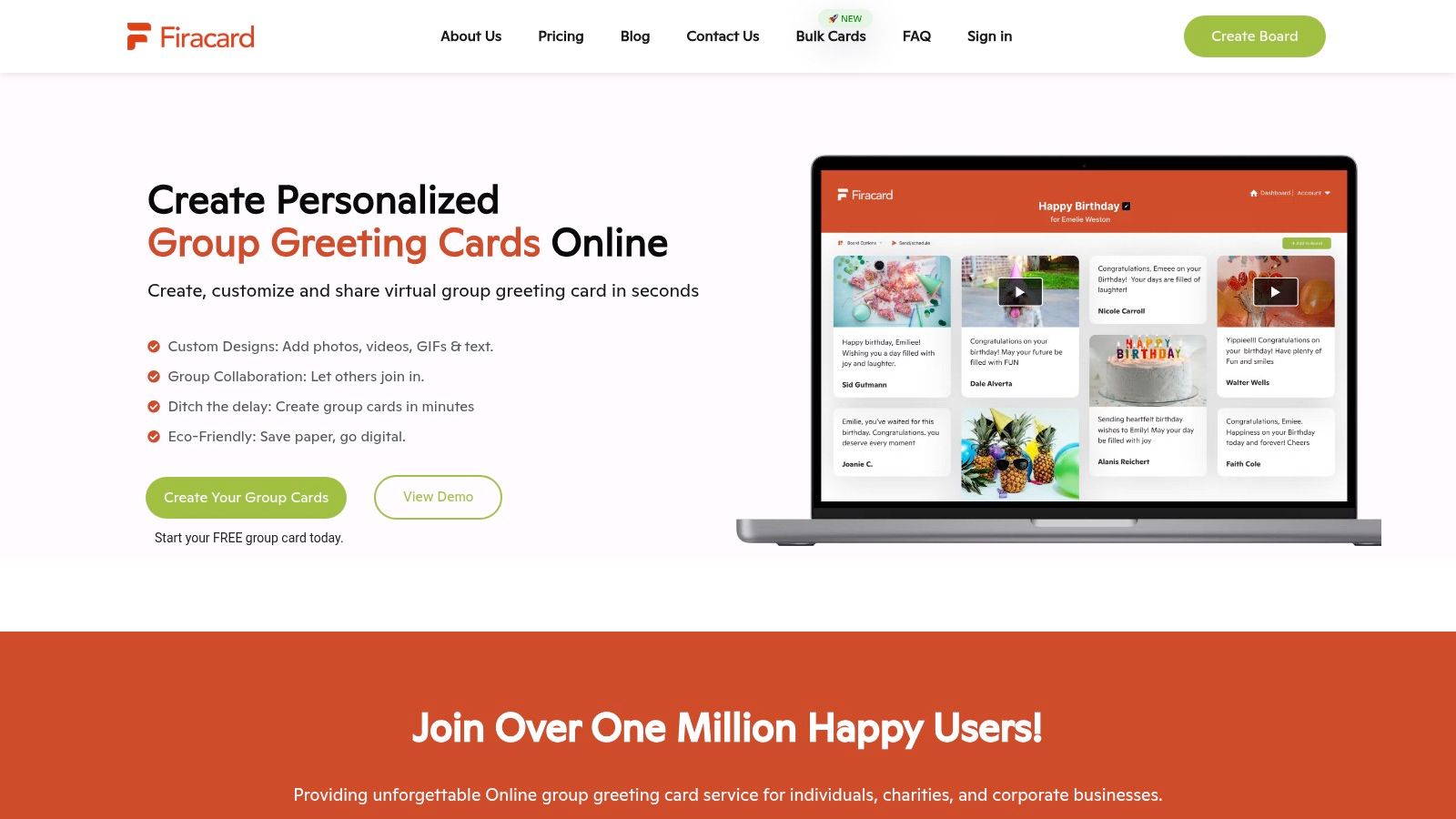
Preview the board as a recipient would see it. Check spelling, names, dates, image crops and the order of the opening content. A preview catches the small errors that make a personalised ecard feel copied, especially when the organiser has created it quickly.
Keep the opening concise. The contributions should provide the depth, whether they come from a partner, family member, colleague or whole department. Your job at this stage isn't to finish the card alone. It's to create a welcoming frame that makes other people want to add something.
Most group cards fail because the invitation asks too much. “Please write something nice and upload a photo by Friday” sounds harmless, but a busy contributor may not know how long the message should be or whether a photo is expected. A good invitation removes those decisions.
Create a shareable board link and send it through the channel people already use. For a workplace card, that might be Teams, Slack or email. For family and friends, messaging apps are often faster. UK trend coverage reports that 81% of UK users send eCards via mobile, with WhatsApp identified as the leading sharing channel, in Ozami's UK greeting-card trends coverage. That makes a mobile-friendly signing path central, not optional.

Give the deadline, the expected effort and the purpose in one message. For example:
Please add a short message to the anniversary card by Thursday. A photo or GIF is welcome, but a few lines are plenty. Use this link on your phone, and I'll send the finished card on the anniversary date.
That wording works because it makes a short message acceptable and treats media as optional. Contributors don't need to search for a perfect photograph or worry that their note will be judged against a polished speech.
For a group video contribution, keep the request specific. Ask people to record a brief greeting in a quiet place, hold the phone steady and say their name if the recipient may not recognise the voice. More detailed guidance on gathering contributions efficiently is available in this resource about collecting group videos quickly.
A reminder should answer the question that stopped people from signing. Mention the deadline, repeat the link and say what's still missing without publicly embarrassing anyone. If the card needs to remain secret, send reminders privately or to the organiser group rather than posting a list of non-contributors.
Keep the board open to different contribution styles. One person may write a warm paragraph, another may add a photograph and a third may record a video. A virtual leaving card or anniversary board feels more genuine when people can contribute in the format that suits them, rather than filling in an identical box under pressure.
Once contributions arrive, the organiser's role changes. You're no longer trying to attract participation. You're checking that the finished card is accurate, appropriate and still a surprise.
Start with access controls. A password-protected board helps keep personal messages and photos within the intended group. This matters especially for workplace cards, where contributors may include private references, and for family celebrations involving children or shared images. Firacard's data protection and compliance guidance is a sensible place to review the privacy questions before sharing widely.
Moderation shouldn't turn every message into the same polished sentence. Correct a misspelt name, remove a duplicate upload and check that links or media work, but preserve the contributor's voice. If a message is unclear or potentially awkward, ask the contributor privately whether they'd like to edit it.
A practical review list includes:
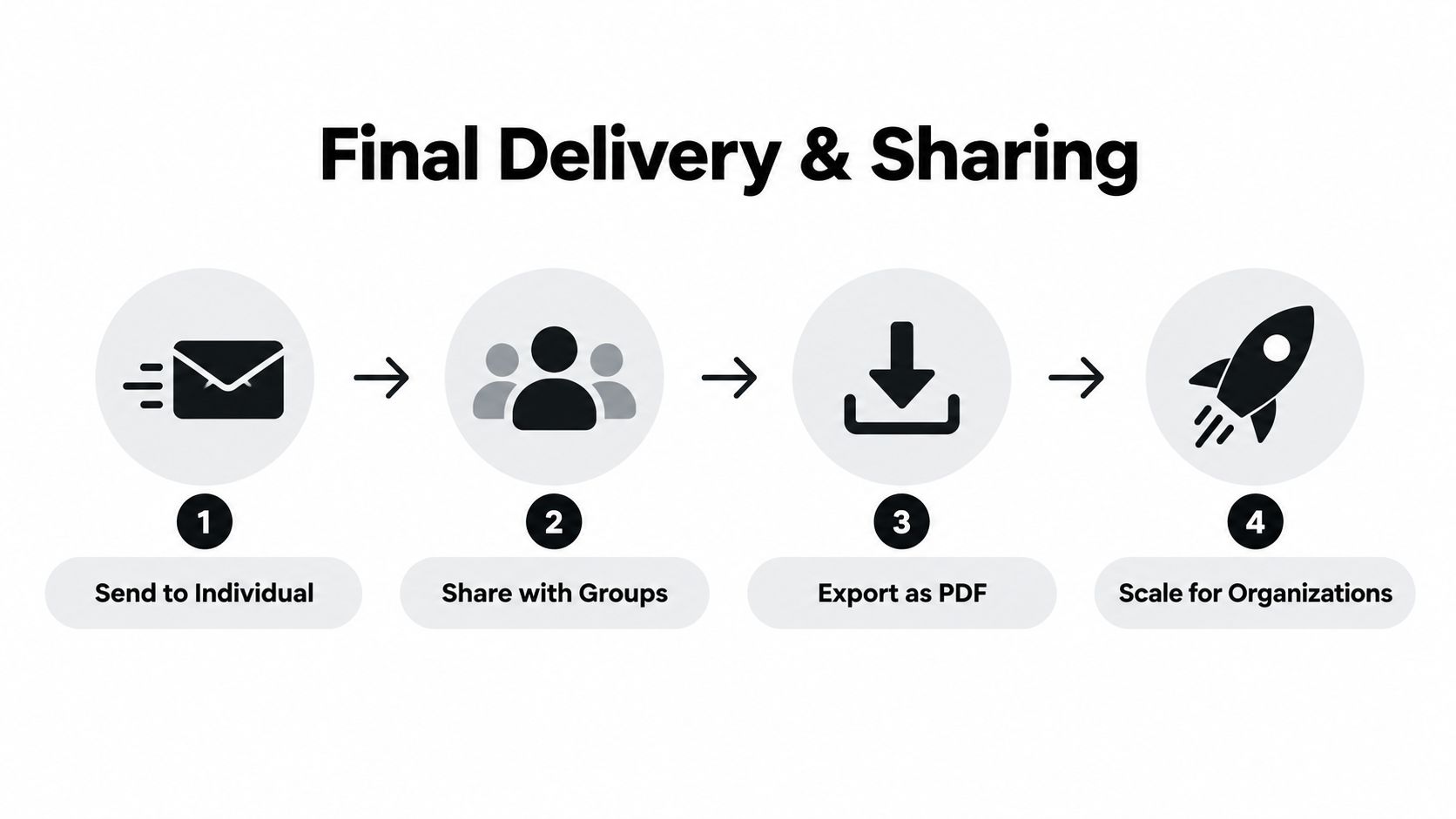
Digital anniversary cards can be sent immediately or scheduled for the anniversary date. That delivery choice is especially useful when contributors live in different regions or the organiser is managing several celebrations. UK anniversary ecard services explicitly support scheduled email delivery alongside recipient-name and custom-message personalisation, as shown in HopeSpring's anniversary ecard collection.
Set the delivery time only after reviewing the complete board. If late contributions are likely, choose a clear internal cut-off and keep the board open until then, but don't leave scheduling to the final minutes. A scheduled send protects the organiser from forgetting while preserving the feeling that the card arrived deliberately.
Delivery is only one part of the value of a collaborative card. A group anniversary card can become a keepsake for the recipient, a record of team culture or a repeatable process for HR and People Operations.
For an individual or couple, export the completed card in a format that's easy to keep. A high-resolution download or PDF can be stored with photographs, printed later or shared with relatives who weren't part of the original contribution. A slideshow export can also work well at a team meeting, provided every contributor has agreed to the content being displayed.
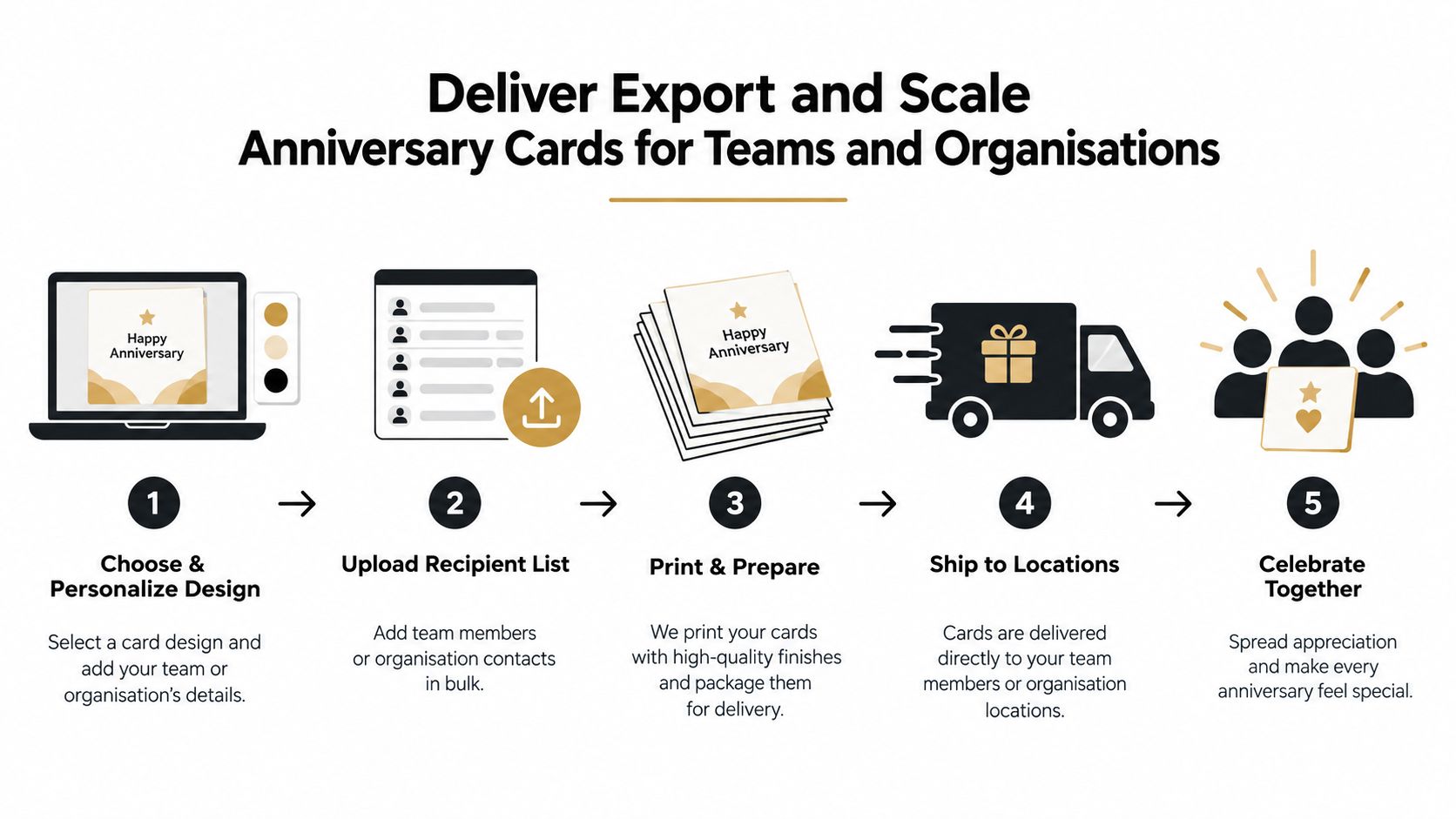
A small personal card needs a simple setup. A department-wide celebration needs contributor capacity, multimedia support, moderation and delivery controls. Firacard provides Free, Premium and Infinity plans with different contributor and feature limits, including options for multimedia, scheduling, multiple recipients and slideshow export. Check the current plan details before choosing, because the right fit depends on the number of people signing and the type of keepsake you need.
For larger programmes, bulk ordering reduces repeated admin. A People team running work anniversaries, farewells and recognition moments can use bulk group greeting cards for teams as a planning reference, then create a consistent process for collecting names, setting deadlines and assigning an organiser.
The useful asset isn't only the exported file. It's the operating pattern behind it:
That structure supports workplaces, schools, universities, charities and distributed teams across the United Kingdom, United States, Australia, Canada, India and Africa. It also makes a kudoboard alternative or groupgreeting alternative easier to evaluate on practical criteria, such as mobile access, contribution limits, scheduling and keepsake options, rather than template appearance alone.
A memorable card doesn't need elaborate design. It needs evidence that contributors know the recipient.
Ask for a specific memory, not a general compliment. “What's one moment you remember?” produces better material than “Write something heartfelt.” For a couple, prompt contributors for a favourite shared story. For a colleague, ask about a moment when the person helped the team, made work lighter or brought people together.
Use media selectively. One clear photograph can carry more feeling than a crowded board of unrelated images. GIFs suit informal groups, while a short video can help remote colleagues sound present when they can't attend a celebration in person. Leave room for simple text, because some contributors will sign from a phone between meetings.
Keep the invitation open long enough for participation, but set a real deadline before delivery. Schedule the card only after checking the recipient's name, date, privacy settings and final media. Don't make the organiser responsible for rewriting every message. Light moderation protects the surprise and the recipient without removing the human rough edges that make a personalized ecard feel personal.
Digital delivery can also support a lower-material celebration, particularly when a physical handoff would be impractical. Paid Firacard cards support tree planting through the platform's partnership with One Tree Planted, so teams that value an eco-friendly recognition habit can consider that impact alongside their budget and workflow needs.
A free anniversary card maker earns its place when it saves coordination time while keeping the emotion intact. The quickest test is to create the board, add one genuine opening message, invite contributors by mobile-friendly link and schedule the finished card before the deadline.
Create a collaborative anniversary card that brings messages, photos and videos together without passing paper between people. Visit Firacard to start a free board, invite contributors across your team or family, and schedule a keepsake for the right day.


Finding the right words for a 50th birthday can feel oddly difficult. You want to honour a major milestone without making the message sound like a
You've just heard that someone you care about has lost a parent. The funeral is approaching, friends are scattered across cities, and nobody w
You can have hundreds of friendly contacts and still feel unsure who would answer when life gets messy, so what makes a friendship good, and how ca